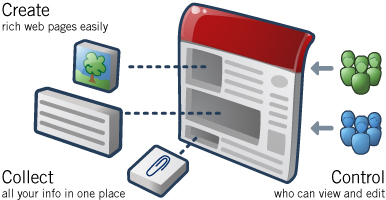
Google Sites makes creating and sharing a group website easy.
Single-click page creation
No HTML required
Customizable look and feel
Settings for accessing and sharing information
And it's free!
Google sites 今日正式对外开放,只要你拥有google账号,就可以创建自己的网站,
会生成如下的网址:http://sites.google.com/site/yourname/
你可以上传文件,有100M的空间。可以编辑网页内容,添加网页,设置主题,更改字体颜色和大小,定制功能还是满强的,相对于个googlepage已经有了很大的进步!
google的服务还是很好的,推荐大家使用。
申请:http://sites.google.com
视频使用教程:http://www.google.com/sites/help/intl/en/video/sites_overview_video.html
如果你有开通GOOGLE APP ,你是Google Sites将有10G,最大上传10M,同是可以绑定你申请APP的域名到你的GOOGLE SITE上面
100M-10G/HTML/支持附件上传/Google免费空间
再谈Google Appengine上传安装SDblog方法
第一步:简要说明创建账号相关。
访问http://appengine.google.com/,使用你的Google帐号登录到App Engine管理平台。(如果你还没有Google帐号,请先申请一个)
创建一个新的GAE应用,请点击按钮 “Create an Application” ,按照提示注册应用程序ID,应用程序ID的名字必须是唯一的。
创建ID后,你就可以拥有一个http://application-id.appspot.com/ 这样的URL地址来访问你的WEB应用了.当然,如果你拥有自己的域名
的话,也可以将其绑定到你自己的应用。
第二步:去http://code.google.com/p/sdapp/downloads/list
下载SDUpload 0.1.rar Google Appengine的第三方上传工具
和SDBlog 1.0.rar SDBlog 1.0正式版
第三步:将SDUpload 0.1解压到你的任意磁盘比如D盘,解压SDBlog 1.0这个文件包,
把里面app.yaml里application:app-id 红色部分改成你的ID后复制sdblog文件夹到你的SDUpload 0.1 的第三方上传工具包
第四步:上传sdblog。
点开始-运行-输入D:SDUpload update sdblog 如果你在D盘建立了新的文件夹比如SDUpload文件夹
那你就输入D:SDUpload/SDUpload update sdblog 打开CMD窗口
到这里会提示你输入登陆邮箱和密码,注意:密码在输入时没有显示,但是确实在输入,不要弄错了。
到这里文件上传完成。
第五步:设置sdblog。
文件上传完成后,输入你的网址,可以看到sdblog默认页面,比如我的http://cinetcn.appspot.com。
此时你必须执行安装sdblog,不然你将无法管理和发表文章,会提示要初始化。
在浏览器打开如:http://cinetcn.appspot.com/install/ 执行安装,一共有4步。
到这里你的SDblog安装就完成了。其它应用程序安装依此类推
成功演示:http://appengweb.appspot.com/
Google 免费天气预报短信提醒
 天 气越来越冷了,每天关心一下温度适当加衣服是必须的。Google推出了一项免费的短信天气预报提醒,可以每天免费接受全国大多数城市的天气情况,如果你 以前使用过其他的Google短信服务的话,输入原来收到的验证码就可以,如果第一次使用或者忘记以前的验证码的话,重新接受一下就可以了。
网站地址@ http://www.google.com/sms/alerts
Advanced Google Tut
Searching Google for Music - Advanced Guide
*credit to my_haz for this superb guide on how to search Google.
This How-To will teach you how to use google to find mp3s. This How-To
will be highly pragmatic and will focus on the hows and not the
wherefores of the various search strings.
Index
----------------------------------------------------------------------
0) Key
1) Directories
2) Xitami Servers
3) Directory Listing
4) Andromeda Servers
5) Zina Artists
6) Apache mp3 Servers
7) Individual Songs
----------------------------------------------------------------------
Section 0 - KEY
----------------------------------------------------------------------
You this are just some definitions I will use below.
[Directory String] can be any of the following :
1) "index of"
2) "last modified"
3) "parent of"
[file type] can be any of the following :
1) "mp3"
2) "shn"
3) "wma"
[mp3 name] can be any of the following :
1) the name of the album in quotes
2) the name of the artist in quotes
3) be daring and leave it blank and have lots of links
4) be creative!
[limitors]
1) -html -htm -php -asp -txt -pls
(inurl:) is optional and may be omitted and in fact most be
omitted if not using a search tool other than google.
(intitle:) can be used in place of (inurl:) and has a similar effect
again you must be useing google.
(-filetype:txt) adding this to the end of your search string can
filter some false positives.
(-playlist) adding this to the end of your search string can
filter some false positives.
----------------------------------------------------------------------
Section 1 - Directories
----------------------------------------------------------------------
These are the most common way that mp3s are stored on the www, you
should try these strings first.
String Format :
Type 1 : [Directory String] + (inurl:)[file type] + [mp3 name]
Type 2 : [Directory String] + (intitle:)[file type] + [mp3 name]
Type 3 : [Directory String] + [file type] + [mp3 name] + [limitors]
Example Strings :
- intitle:index.of + mp3 + "grandaddy" -html -htm -php -asp -txt -pls
- "index of" + "mp3" + "radiohead" -html -htm -php
- "index of" + mp3 + "grandaddy"
- "index of" + inurl:mp3 + "beatles" -txt -pls
- "index of" + intitle:mp3 + beatles
- "last modified" + "shn" + "dylan"
- "last modified" + inurl:shn + "bob dylan"
- "parent of" + inurl:wma + "grandaddy"
Suggestions :
- Try (intitle:index.of + "mp3" + "band name" -htm -html -php -asp) first it
is usually the most effective.
Another Little Trick:
- If you have been getting alot of results on google but the pages don't seem
to be there try adding dates and the "apache" string to your search i.e.
- intitle:index.of + mp3 + "grandaddy" -html -htm -php -asp apache feb-2005
- intitle:index.of + mp3 + "grandaddy" -html -htm -php -asp apache 2005
or if you just want a big list of mp3' doing a search like this everymonth
- intitle:index.of + mp3 + -html -htm -php -asp apache mar
----------------------------------------------------------------------
Section 2 - Xitami Servers
----------------------------------------------------------------------
String Format :
Type 1 : "xitami web server" + (inurl:)[file type] + [mp3 name]
Type 2 : "xitami web server" + (intitle:)[file type] + [mp3 name]
Example Strings :
- "xitami web server" + "mp3" + "radiohead"
- "xitami web server" + intitle:shn + "beatles"
- "xitami web server" + inurl:mp3 + "magnetic fields"
----------------------------------------------------------------------
Section 3 - Directory Listing
----------------------------------------------------------------------
String Format :
Type 1 : "directory listings" + (inurl:)[file type] + [mp3 name]
Type 2 : "directory listings" + (intitle:)[file type] + [mp3 name]
Type 3 : "directory listings of" + (inurl:)[file type] + [mp3 name]
Type 4 : "directory listings of" + (intitle:)[file type] + [mp3 name]
Example Strings
- "directory listings" + "mp3" + "radiohead"
- "directory listings" + intitle:shn + "beatles"
- "directory listings" + inurl:mp3 + "magnetic fields"
- "directory listings of" + "mp3" + "radiohead"
- "directory listings of" + intitle:shn + "beatles"
- "directory listings of" + inurl:mp3 + "magnetic fields"
----------------------------------------------------------------------
Section 4 - Andromeda Servers
----------------------------------------------------------------------
String Format :
Type 1 : "scott matthews" + andromeda + [mp3 name]
Type 2 : "scott matthews" + andromeda + [file type] + [mp3 name]
Type 3 : "powered by andromeda" + [mp3 name]
Type 4 : "powered by andromeda" + [file type] + [mp3 name]
Type 5 : inurl:andromeda.php + [mp3 name]
Type 6 : inurl:anromeda.php + [file type] + [mp3 name]
Type 7 : "scott matthews"
Type 8 : "powered by andromeda"
Type 9 : inurl:andromeda.php
Examples :
- "scott matthews" + andromeda + "radiohead"
- "scott matthews" + andromeda + "mp3" + "fitter"
- "powered by andromeda" + "gradaddy"
- "powered by andromeda" + "mp3" + "just like women"
- inurl:andromeda.php + "shn"
- inurl:anromeda.php + "wma" + "dylan"
- "scott matthews"
- "powered by andromeda"
- inurl:andromeda.php
----------------------------------------------------------------------
Section 5 - Zina Artists
----------------------------------------------------------------------
String Format :
Type 1 : "zina artists"
Examples :
- "zina artists"
----------------------------------------------------------------------
Section 6 - Apache mp3 Servers
----------------------------------------------------------------------
String Format :
Type 1 : "stream all" + apache + [mp3 name]
Type 2 : "stream all" + apache
Type 3 : "shuffle all" + apache + [mp3 name]
Type 4 : "shuffle all" + apache
Examples :
- "stream all" + apache
- "stream all" "shuffle all" mp3
- "stream all" + apache + radiohead
- "shuffle all" + beatles
----------------------------------------------------------------------
Section 7 - Individual Songs
----------------------------------------------------------------------
Format : [mp3 name].mp3 -playlist -filetype:txt
Examples :
- "ok_computer_live.mp3" -playlist -filetype:txt
- "*ok_computer*.mp3" -playlist -filetype:txt
- kid*a.mp3 -playlist -filetype:txt
##########################################
2nd Method:
Here is a second example of maximizing search results on Google:
1. At Google Search, type in one of the following two phrases (try the first one; if you're not happy with the results, try the second one on your second search):
* "index of/mp3" -playlist -html -lyrics
* "index of/" mp3 -playlist -html -lyrics
2. If you'd like, add an artist's name or song name to the end of the phrase, then click the Search Button.
3. Here are a few examples:
* "index of/mp3" -playlist -html -lyrics beatles
* "index of/mp3" -playlist -html -lyrics punk
This tip helps you find directories filled with mp3 files by finding Apache's Index page:
1. At Google Search type in the following code:
2. +("index of") +("/mp3"|"/mp3s"|"/music") +(mp3|zip|rar) +apache
3. By editing this code, you can search for any type of media; oog, wav, pdf, etc.
4. Be sure to edit both the directory names as well as the file extensions if edited.
Finding mp3 and compressed files searching by title:
1. At Google Search type in the following code:
2. allinurl: +(mp3|rar|zip|tgz) TheTitle
3. Replace TheTitle with either a song title, artist name, or album.
4. Here are a few examples:
* allinurl: +(mp3|rar|zip|tgz) beatles
* allinurl: +(mp3|rar|zip|tgz) revolver
* allinurl: +(mp3|rar|zip|tgz) greatest hits
--------------------
& to find cell phone programs:
just type the following line in your google search box and see experience a new world of finding games
for games
"parent directory" nokia games -xxx -html -htm -php -shtml -opendivx -md5 -md5sums
for tones
"parent directory " nokia polyphonic -xxx -html -htm -php -shtml -opendivx -md5 -md5sums
for symbian games
"parent directory " symbian games -xxx -html -htm -php -shtml -opendivx -md5 -md5sums
for Wallpapers
"parent directory " nokia wallpapers -xxx -html -htm -php -shtml -opendivx -md5 -md5sums
for general Midi
"parent directory " midi -xxx -html -htm -php -shtml -opendivx -md5 -md5sums
also try using "Index of" instead of "parent directory"
--------------------
and other tips:
You've probably seen some sites that allow you to Google their site for a certain term. This is accomplished via the "site" advanced operator. The following syntax is used for the site operator:
site:site_to_search
For example, if we wanted to search www.projectfearless.com
for the term "Nielsosky", we would use the following:
Nielsosky site:projectfearless.com
or
example:
site:blabla.com
----------------------------------------------------------
The "inurl" advanced operator is used to search for a term within
URL's. For example, searching for "inurl:binaryuniverse" searched
for all sites that have the term "binaryuniverse" in their URL.
The "intitle" is used to search for a term in the title. Thus,
"intitle:binaryuniverse" finds all pages with "binaryuniverse"
in their title.
------------------------------------------------------------
Google keeps caches of pages. When the Google spider indexes a page,
it stores a copy of it. Thus, the cache is a copy of what the page was
like at an earlier date. To view the cache for a page, you can simply
search for the page, and then click the "cache" link underneath.
However, there is a quicker way, that involves only typing in
search terms, and not clicking. Simply type "cache:pageurl.com"
to view the cache of a page (in this case pageurl.com).
------------------------------------------------------------
Google also allows you to search for pages of a certain filetype,
using the syntax "filetype:TYPE". Replace 'TYPE' with the file type
you want to search for. So, if you wanted to search for tutorials
on SQL that are in PDF format, you would search for the following:
SQL Tutorial filetype:PDF
--------------------------------------------------------------
Not only is Google the world's best search engine, it also happens
to be a mighty fine dictionary. To use it as a dictionary, just type
"define:TERM", and replace TERM with the word you wish to look up.
For example, if you want to look up "roflmao", type "define:roflmao",
without the quotes. This will give you several different resources
for definitions or roflmao. Fyi, roflmao means "rolling on the floor laughing my ass off".
----------------------------------------------------------------
And now, it's time for some fun -- Google whacking. Actually, after
a couple minutes, I have found Google whacking to become extremely
boring, not to mention frustrating. A google whack is a two-word query
that returns one result. You may not use quotes, and both words in
the query must be real words. And yes, it is very hard.
For more info, I suggest you check out http://googlewhacking.com
At this point, the basics of Google have been covered, and you should
be a moderately good Googler.
--------------------
how to search for STUFF at google
method 1
put this string in google search:
"parent directory " /appz/ -xxx -html -htm -php -shtml -opendivx -md5 -md5sums
"parent directory " DVDRip -xxx -html -htm -php -shtml -opendivx -md5 -md5sums
"parent directory "Xvid -xxx -html -htm -php -shtml -opendivx -md5 -md5sums
"parent directory " Gamez -xxx -html -htm -php -shtml -opendivx -md5 -md5sums
"parent directory " MP3 -xxx -html -htm -php -shtml -opendivx -md5 -md5sums
"parent directory " Name of Singer or album -xxx -html -htm -php -shtml -opendivx -md5 -md5sums
Notice that i am only changing the word after the parent directory, change it to what you want and you will get a lot of stuff.
method 2
put this string in google search:
?intitle:index.of? mp3
You only need add the name of the song/artist/singer.
Example: ?intitle:index.of? mp3 jackson
method 3
put this string in google search:
inurl:microsoft filetype:???
method 4
put this string in google search:
intitle:index.of.???
method 5
put this string in google search:
"name of object"download
"name of object download"
free "name of object"download
free "name of object download"
Or just look for the filename(s).
and instead of using the inurl: tag, use site: that works too.
For Rapidshare:
http://www.google.com/search?q=+.zip+OR+.rar+OR+.pdf+site:rapidshare.de&hl=en&lr=&c2coff=1&as_qdr=all&start=510&sa=N
or movies:
http://www.google.com/search?q=+.wmv+OR+.avi+OR+.mpeg+OR+.rm+site:rapidshare.de&hl=en&lr=&as_qdr=all&start=10&sa=N
or music:
http://www.google.com/search?q=+.MP3+OR+.WMA+OR+.Ogg+OR+.rm+site:rapidshare.de&hl=en&lr=&as_qdr=all&start=10&sa=N
Just play with the extensions.
---------------------------------------------
E-Books
inurl:ebook.DDU | inurl:ebook.EEN | inurl:ebook.JGT | inurl:ebook.LiB | inurl:ebook.EAT
There's a few ways to differentiate from that to change the outcome in your favor as well. For example, you can take away the "inurl:" to get many hits on things like forum posts or BitTorrent links. (Helpful if you're looking for something rare.)
You can also add the file type you like (such as PDF, CHM, LIT, etc) to get a specialized search. Finally, don't forget to put () or else Google may get confused. When defining a OR statement, Google expects the () to surround it. For example, you could search for:
- (ebook.DDU | ebook.EEN | ebook.JGT | ebook.LiB | ebook.EAT )
or
- PDF (ebook.DDU | ebook.EEN | ebook.JGT | ebook.LiB | ebook.EAT )
or get fancy with
- (PDF | CHM | LIT | ZIP | RAR | ISO) (ebook.DDU | ebook.EEN | ebook.JGT | ebook.LiB | ebook.EAT)
You can also use "Parent Directory"+ in front of it but don't limit the search to Google, try several engines.
A nice site for Rabbits & webbits:
http://www.searchlores.org/rabbits.htm
added 6/6/05
Music Filetypes:
MP3
WMV
WAV
AIF
AIFF
Movie Filetypes:
MPG
MPEG
AVI
WMV
RM
MOV
Picture Filetypes:
JPG
JPEG
GIF
TIFF
TIF
PNG
BMP
Compressed Filetypes (Used to search for programs):
ZIP
RAR
ISO
BIN
EXE <- Be extremely careful when searching for EXE files, make sure you run a complete virus scan on any of the compressed filetypes.
Document Filetypes:
DOC
RTF
TXT
PDF
SWX
These are just a few of the things that you can search for using Google. It is an extremely powerful tool that can be used to find just about anything you could ever want on the internet. While I am not condoning pirating and filesharing, I feel that the sharing of information is absolutely essential to the survival of the internet. After all, the internet was founded on the idea of sharing information, Google just allows us to index all of that information into an easily searched archive.
Find net cams with the following searches:
inurl:"ViewerFrame?Mode="
intitle:"WJ-NT104 Main Page"
inurl:netw_tcp.shtml
intitle:"supervisioncam protocol
(oops, just noticed this info has been posted! Sorry)
申请从谷歌的索引中删除内容
(译者注: 本文讲述了如何申请从谷歌的索引中删除内容,包括你自己拥有的内容及其他你所不拥有但是包含特殊信息的内容,如不健康内容或你的个人信息)
作为网站拥有者,网站的什么内容被搜索引擎索引,你完全可以控制。当你想让搜索引擎知道什么样的内容您不希望它们索引时,最简单的方法是使用robots.txt文件或robots元标记。但有时候,你想要删除已经被索引的内容。有什么最好的方法来做到这一点呢?
同以往一样,我们的回答总是这样开始:这取决于你想要删除的内容的类型。我们的网络管理员帮助中心提供了每种情况的详细资料。每当我们重新爬行该网页, 我们就会从我们的索引中自动移去你要删除的内容。但如果你想更快地删除你的内容,而不是等待下一次的爬行,我们刚刚有了一些方法使做到这一点变得更为容易。
如果你的网站已经通过了网站管理员工具帐号的网站拥有者验证,你就会看到在"工具"下有一个删除网址链接。要想删除,你可以点击删除网址链接,然后再点击新增删除请求。请选择你想要的删除类型。
单个网址
如果你想移除一个URL或图像,请选择此项。一个可以删除的URL必须符合以下条件之一:
* 该URL必须返回一个404或410的状态码。
* 该URL必须被该网站的robots.txt文件所阻截。
* 该URL必须被robots元标记所阻截。
如果一个URL可以被删除了,你输入该URL,看看它是否出现在我们的网页搜索结果或图像搜索结果里。然后点击添加。您可以一次添加多达100个URL的请求。当你添加完所有你想删除的URL后,点击“提交删除请求”。
单个目录
如果你想删除你站点的一个目录下的所有文件和子目录,请选择此选项。例如,如果你请求删除以下内容:
http://www.example.com/myfolder
这将删除所有以该路径为开头的URL,譬如:
http://www.example.com/myfolder
http://www.example.com/myfolder/page1.html
http://www.example.com/myfolder/images/image.jpg
为了使目录可以被清除,你必须用robots.txt文件来阻截搜索引擎。例如,上面的例子中, http://www.example.com/robots.txt可以包括以下内容:
User-agent: Googlebot
Disallow: /myfolder
你的整个网站
只 有当你想从Google索引删除你的整个网站时,才选择此选项。此选项将删除所有子目录及文件。对于你网站的被索引的URL中你不喜欢的版本,请不要使用 此选项来删除。举例来说,如果你想你的全部URL只有www的版本才被索引,请不要使用这一选项来请求删除非www的版本。你可以使用设置首选域名工具来 指定你希望被索引的版本(如果可能的话,做一个301重定向到你喜欢的版本)。使用此选项,你必须使用robots.txt文件拦截或删除整个网站。
缓存副本
要删除你的网页在我们索引中的缓存副本(又称网页快照--译者注),请选择此项。你有两种方法来使你的页面符合删除页面缓存的条件。
使用noarchive元标记来要求快速删除
如 果你根本不想让你的页面被缓存,你可以在该页面上加一个noarchive元标记,然后再在工具中要求快速删除缓存副本。通过使用工具来要求删除缓存副 本,我们会立刻执行。由于添加了noarchive元标记,我们将永远不会有该页的缓存版本。 (当然,如果你以后改变主意,你可以去掉noarchive元标记)。
改变网页内容
如 果你的某一页面已被删除,你也不想让它的缓存版本存在于Google的索引中,你可以在工具里请求删除缓存。我们会先检查一下该页的现有内容是否真的有别 于缓存版本。如果是,我们就会清除缓存版本。我们会在6个月后自动显示最新的缓存页面版本(6个月后,我们可能已经又爬行过你的页面,缓存版本会反映最新 的内容),或者,如果你发现我们早于6个月重新爬行了你的页面,你可以用工具要求我们早一点重新包含缓存版本。
查阅删除请求状态
你的删除请求状态将是“等待中(Pengding)”,直到他们被处理。处理后的状态变化,要么是“被拒了(Denied)”或者是“删除了”。一般来说,如果被拒绝,它一定是不满足被删除的条件。
请求内容的重新收录
如 果请求是成功的,它就会出现在删掉的内容栏里。你可以随时重新收录你的网页,只要删掉robots.txt中的相关内容或相关页上的robots元标记, 然后点击Reinclude。删除内容的有效期是六个月。六个月后,如果我们重新爬行网页时网页内容仍然是被阻截的或者返回一个404或410状态信息, 它就不会被重新索引。不过,如果六个月后该页面可以被我们的抓取工具抓取,我们将再次把它列入我们的索引。
请求删除不是你拥有的内容
如果您想要求删除的内容在不属于你的网站上,怎么办呢?现在做到这一点更容易了。我们的新的网页删除请求工具逐步和你完成每个类型的删除过程。
因为Google仅仅索引网页,并不能控制网页的内容,我们通常不能从我们的索引中随便删除一些结果,除非网络管理员阻截Google、修改了内容或删除了页面。如果您想删除某些内容,你可以和网站所有者进行一下沟通,然后用此工具来加速从我们的搜索结果删除。
但是,如果您发现搜索结果中包含特定类型的个人信息,你可以请求删除,即使你不能和网站所有者沟通。对于这种类型的删除,请提供您的电子邮件地址,以便我们能够与您直接沟通。
当启动健康内容搜索时,如果您发现一些搜索结果中有不健康的内容,你也可以使用工具通知我们。
你 可以查阅“等候中”请求的状态。在当前网站管理员工具的版本中,一旦请求被处理,请求状态将会变成“已删除”或“拒绝”。一般来说,如果被拒绝,它一定是 不满足被删除的条件。对涉及个人信息的请求,您看不到任何状态,但是你会收到一封电子邮件来要求你为以后的步骤提供更多的资料。
老的URL删除工具中的请求会有什么样的结果呢?
如果您已经用老的URL删除工具提交了删除请求,你仍然可以登录来查阅这些请求的状态。但是,如果你有新的请求,请使用现在的新的和改进的工具版本。
原文地址:http://www.googlechinawebmaster.com/2008/01/blog-post_24.html


一步到位搞定Google 广告!
经常说Google的好,有时候,我女朋友就这么说我:“你是Google的托…”把不好的部分都遮盖了,只说好的。就 比如 Google Adsense 的广告已经不满网络上的“大街小巷”了。其实对于Google来说,并没有错,毕竟Google是商业机构,不是慈善机构!在发布种种免费午餐 某些方面领导IT未来方向的大前提下,赚钱 也是他们的目的。

不过 有广告哪就势必会影响我们打开网页的速度,尤其是对于某些不懂界面设计,不懂如何去摆放广告位置的站长来说,那Google广告就会让人生厌!于是 我们可以经过Google Adsense的“特性”来去除所有Google广告:
原理:
(如果不想详细了解的朋友只需要跳过这段 直接到操作部分即可)
Google Adsense 是通过一系列颜色,大小,分类设置之后,Google给出广告源代码,由站长拷贝到其站点中去,最后生成广告内容。比如 我使用默认设置后得到以下广告源代码:
Part One:
我们可以发现,广告分为2部分:
第一部分就是包含:站长注册Google Adsense的客户端号码,用于广告结算金额;其余包含长宽高类型等等。
第二部分就是Google广告最重要部分:广告呈现出的内容在“http://pagead2.googlesyndication.com/pagead/show_ads.js” 这个地址上。其中“pagead2”是按编号的不同而不同 可能为“pagead1”“pagead3”…等等
操作
- For Internet Explorer:使用 IE的朋友,可以把 http://*.googlesyndication.com/pagead/show_ads.js 这个地址添加入 IE 的不信任地址列表:打开“控制面板”
“Internet 选项”
- 点了“受限制站点”后, 点“站点”按钮
地址复制进去,然后按“添加”,“OK”


- For FireFox:
使用 Firefox 的朋友,下载安装 Adblock Plus 的插件即可,同时将上述地址添加到滤地址中。
安装查检后 重启FireFox, 多出了Adblock选项,点击它
点击“Add filter”
将地址输入,点击 OK 结束经过这样一步到位的方式 将来遨游在网络世界中 你的浏览器中就不会再显示 Google Adsense 的广告了。其实同类似手法,将来只要你知道广告的URL 就可以将其添加到IE或FireFox的过滤地址中。同样的广告不会出现第二次!


订阅:
博文 (Atom)